License usage in the DOC
Version 2025.1 changes the way in which licenses are counted for certain systems, particularly relating to terminal servers. These systems now require a separate server license. User sessions on terminal servers will no longer be counted toward license usage.
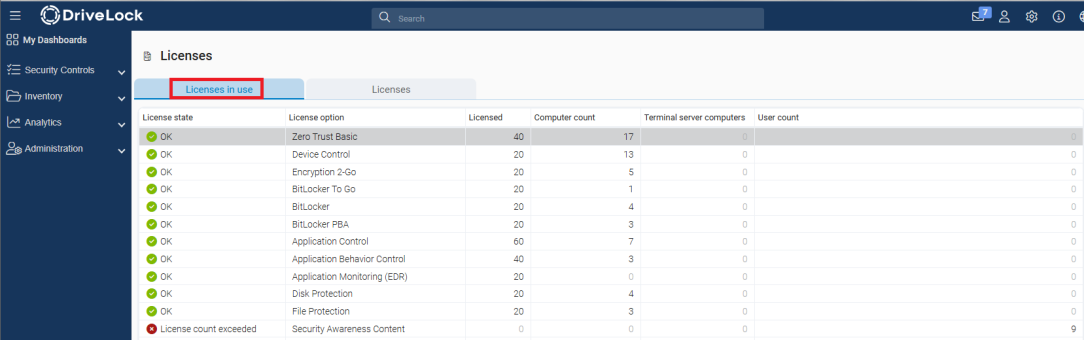
The new Terminal server computer column has been introduced to provide a better overview. It shows the number of terminal servers reporting an active agent and is only populated for modules that offer specific functionality on terminal servers. This value is for informational purposes only and is not included in the license evaluation.
The User count column continues to display reported user sessions (local and via terminal servers). With the exception of the Security Awareness module, this number is also no longer included in the evaluation. For the Security Awareness module, the user count corresponds to the number of users who have participated in campaigns. This number continues to be used for determining the license status.
In future, license usage will be evaluated on the basis of the number of computers, i.e. the number of computers with active agents. It is compared with the number of licenses entered in the Licensed column. This comprises licenses for registered computers and one license per terminal server.
The License state is therefore determined by comparing the number of computers (Computer count column) and the number of licenses (Licensed column): If the number of reported computers is less than or equal to the purchased licenses, the licensing is sufficient. If this is exceeded, a message is displayed accordingly.
Example: The figure below shows that the License state for Security Awareness is not correct. The number in the User count column exceeds the number of available licenses.