Create script definitions
Configuration: DOC -> Security Controls -> Applications -> Configuration -> Script Definitions
Script definitions specify which file types and interpreters Application Control recognizes as script execution. These definitions are required to use the Run script access mode in application behavior rules.
A script definition associates the file extensions of a script type with the corresponding interpreters. This allows Application Control to identify which file accesses represent script execution.
Create a script definition
-
Under Script Definitions, select the + button to create a script definition.
-
Under Basic properties, configure the following settings:
-
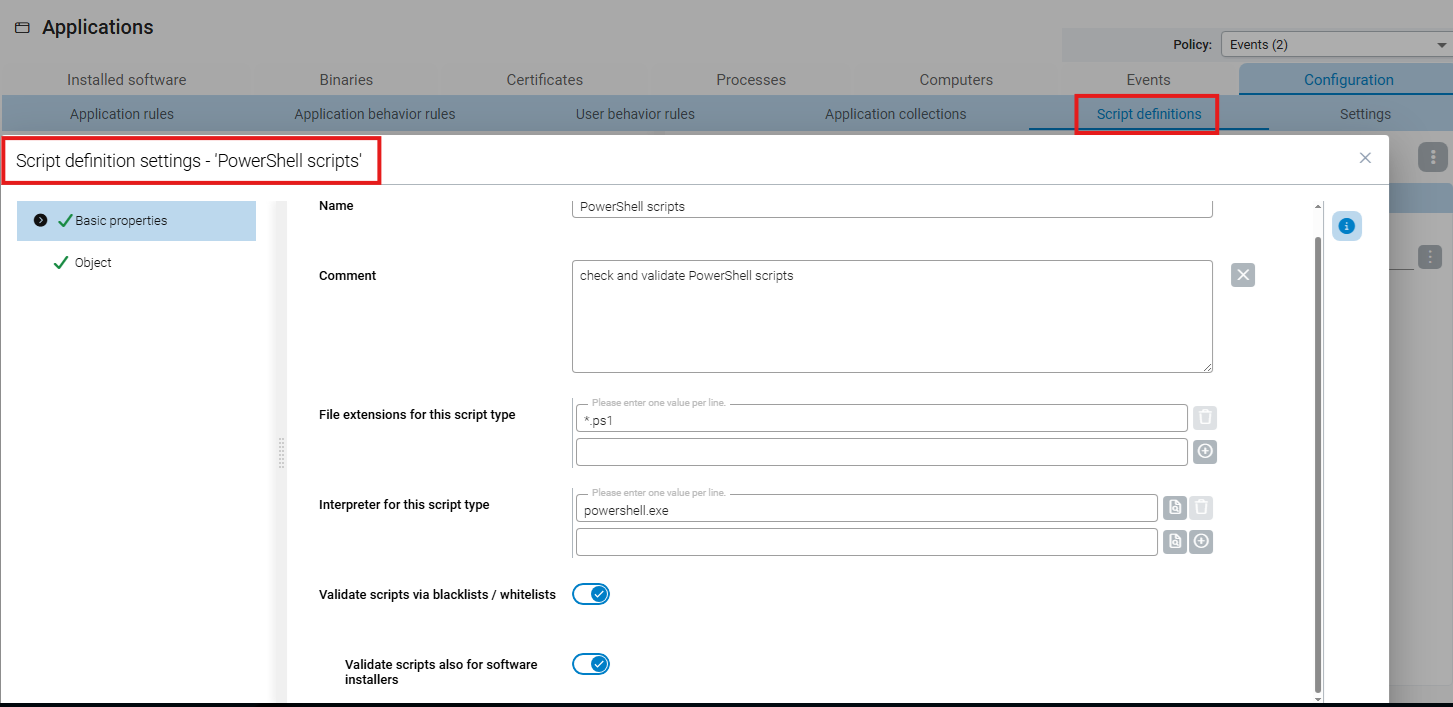
Name: Enter a descriptive name for the script definition.
-
Comment: Enter additional information about the script definition if needed.
-
File extensions for this script type: Enter file extensions in the format
*.<Dateiendung>, for example*.ps1for PowerShell scripts. Add each file extension as a separate entry. -
Interpreter for this script type: Specify the programs that can execute scripts of this type, such as
powershell.exefor PowerShell scripts. Add each interpreter as a separate entry. -
Validate scripts via blacklists / whitelists: Enable this setting to validate scripts against the configured blacklists and whitelists, as is also possible for executable files and DLLs.
-
Validate scripts also for software installers: Enable this setting to apply script validation to scripts executed during software installations or updates. This option is available only when Validate scripts via blacklists / whitelists is enabled.
The following figure shows a script definition for PowerShell scripts:
-
-
Select Save or Save and close to save the script definition.
When validating scripts during software installations, the settings for trusted processes may also be relevant.
Events for script execution
Application Control logs script execution using events 795 (Script blocked) and 796 (Script executed). These events contain additional information about the script file, such as its file path, hash, size, owner, and certificate information. For more information, see Application Control events.