Scope
Under Scope, specify which computers and logged-on users a configuration applies to and, if applicable, at what times. The available options depend on the configuration type and can be combined.
Computer filter
Use the computer filter to specify the computers or organizational units to which a rule or configuration filter applies.
|
Setting |
Description |
|---|---|
|
Active on all computers (default) |
The rule or configuration filter applies to all managed computers. |
|
Active on selected computers |
The rule or configuration filter applies only to the selected computers or organizational units. |
|
All computers except selected |
The rule or configuration filter applies to all computers except the selected computers or organizational units. |
Logged-on users
Use the user filter to restrict the scope to specific logged-on users or user groups, or to exclude them. For more information, see Logged-on users.
Time restrictions
For rule types that support time restrictions and for configuration filters, you can restrict the scope to specific days of the week, times, or a defined period.
-
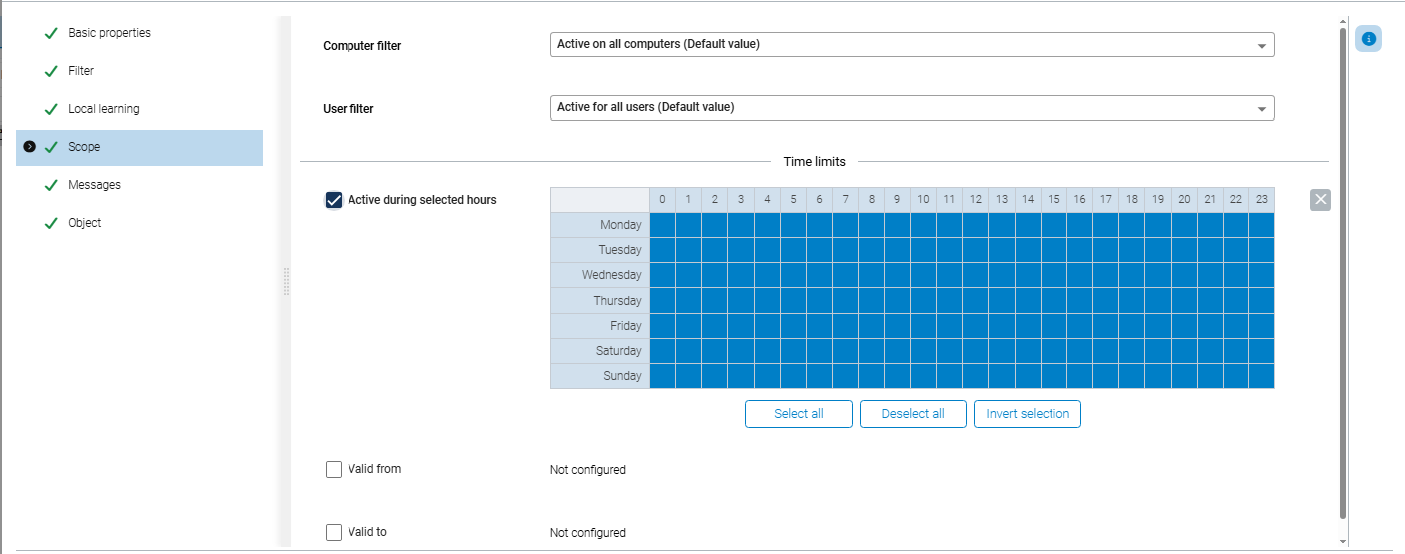
Active at selected times: Enable this option to define the scope using a weekly schedule. Select the required days of the week and hours in the table. Use the Select all, Deselect all, and Invert selection buttons to modify your selection.
-
Valid from: Enable this option and specify the date from which the rule or configuration filter applies.
-
Valid until: Enable this option and specify the date until which the rule or configuration filter applies.
The time conditions can be combined. For example, you can define a period during which the rule or configuration filter applies only on certain days of the week and at selected times.
The following figure shows the scope conditions of an application rule. Some options may not be available depending on the rule type.
A rule or configuration filter is applied only if all configured scope conditions are met.