Unlock requests
Unlock requests allow users to request the unlocking of blocked drives, devices, applications, or executable files. The request is submitted to the DriveLock Operations Center, where it can be processed by an administrator.
How it works
Unlock requests are created when a user wants to unlock an object blocked by DriveLock and the corresponding policy settings allow it.
Depending on the configuration, the request can apply to a single drive or device, or to all drives of a drive type or all devices of a device class.
For Application Control, users can also request unlocks for blocked applications or binaries.
Prerequisites
To create unlock requests, the corresponding options must be enabled in the policies.
For drives and devices, unlock requests are configured at the drive type and device class level.
Separate settings are available within Application Control for applications and executable files.
Starting with version 2026.1, unlock requests for drives and devices are disabled by default and must be explicitly enabled for the corresponding drive types or device classes.
Unlock requests for drives and devices are supported on Windows, Linux, and macOS agents. Starting with version 2026.1, the user interface on macOS has been aligned with the cross-platform user experience.
Unlock requests in the DOC
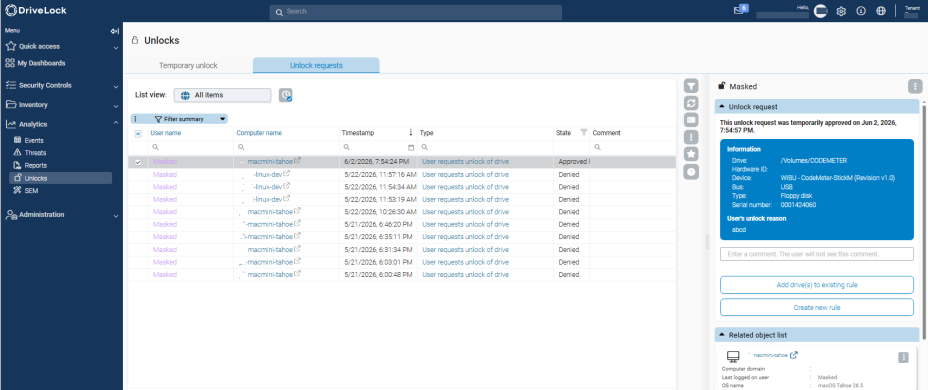
Unlock requests are displayed in the DriveLock Operations Center under Analysis > Unlocks > Unlock requests.
The details view contains information about the requested object, the user, the computer, and the reason for the request.
Processing unlock requests
Administrators can approve or reject unlock requests.
For drives and devices, an approval can also be used to permanently unlock the requested object. To do so, the object can be added to an existing rule or allowed through a new rule.
Approved requests can therefore result in either temporary or permanent unlocks.
Unlock requests and Self-Service
With unlock requests, an administrator decides whether the unlock is granted. In contrast, Self-Service unlocks are initiated directly by the user within the limits defined by the Self-Service rules.
Related topics