Use case: Self-Service for Application Control
Goal: Allow specific users to run applications that are not permitted by Application Control in exceptional situations or during maintenance activities. The user performs the unlock without administrator intervention, and the unlock remains active only for a limited period of time.
This use case temporarily disables Application Control through Self-Service. The local whitelist is neither modified nor extended.
Please do the following:
-
Enable the Self-Service Wizard for the relevant computers. For more information, see Enabling the Self-Service Wizard.
-
In the DOC, create a new Self-Service rule under Security Controls > Agent Settings > Temporary unlock > Self-Service rules.
-
Under Scope, assign the users and computers that are allowed to use Self-Service.
-
Under Modules, configure the unlock options for Application Control so that users can temporarily disable Application Control during the unlock.
-
Under Options, define which additional settings apply to the unlock. Depending on the setting, you can specify whether a function is disabled, enabled, or can be selected by the user in the Self-Service Wizard.
For this use case, the Learn launched applications option is particularly relevant. If you do not want to extend the local whitelist, select No.
-
Under Parameters, configure the conditions for the unlock, such as the maximum unlock duration, the default duration, and requirements for the unlock reason.
-
Save the rule and publish the policy.
-
After the policy update, the user can start the Self-Service Wizard and perform the unlock.
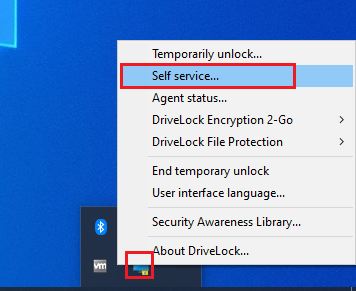
-
Once the unlock expires, the original Application Control settings automatically take effect again.
Related topics