Offline unlocks
Offline unlocks allow the temporary unlocking of blocked drives, devices, applications, and other protection mechanisms on computers that cannot connect to the DriveLock Enterprise Service (DES) or the corporate network.
They are configured through the policy's agent settings. Offline unlock configuration is available in both the DOC and the DMC.
Offline unlocks are disabled by default and must first be enabled in the Agent settings.
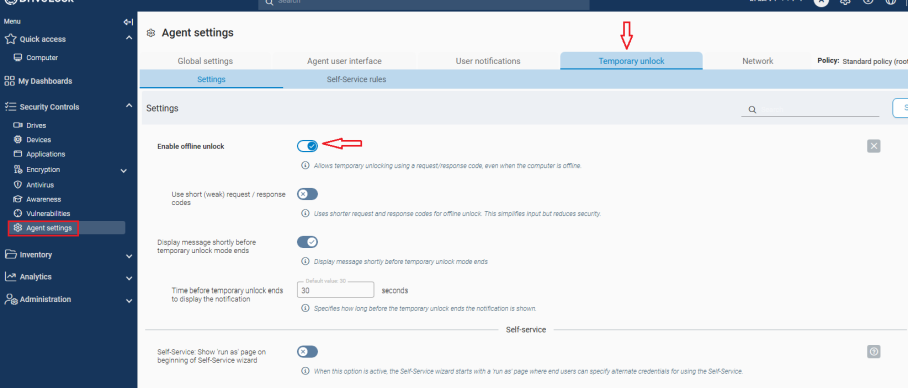
This method is typically used when users are outside the corporate network or when a computer is temporarily disconnected from the network.
How it works
Offline unlocks are based on a challenge-response process. The user generates a request code on the affected computer and provides it to an administrator. The administrator generates an unlock code, which the user then enters on the computer.
After successful validation, the unlock is activated for the configured period. Once the unlock period expires, the original policy settings are automatically restored.
Request and unlock codes for offline unlocks are time-limited. The unlock code must be entered on the target computer within 60 minutes of being generated. After this period expires, a new request code must be generated.
Available unlocks
Depending on the configuration, offline unlocks can be used for various protection mechanisms. These include, among others:
-
Drives
-
Devices
-
Smartphones
-
Applications
-
Microsoft Defender Management
Additional unlock options can be enabled, for example for file filters, encrypted drives, or local application recognition.
The offline unlock option is only displayed in the DriveLock Agent user interface if offline unlocks are configured for the corresponding drive type or device class.
Authentication
Additional authentication may be required to create offline unlocks. In the DriveLock Management Console (DMC), authentication can be performed using a password or a certificate, depending on the configuration.
When offline unlocks are configured through policies managed in the DriveLock Operations Center (DOC), no additional password or certificate settings are required. This configuration is supported by DriveLock Agents starting with version 26.1.
Offline unlocks and unlock requests
With an unlock request, the user requests the unlocking of a blocked object. The request is then processed by an administrator.
With an offline unlock, the administrator directly generates an unlock code for a specific computer. No connection to the DriveLock Enterprise Service is required.
Platform support
Offline unlocks are supported on Windows and Linux agents.
Offline unlocks are not available on macOS agents.
Related topics