Use case: Create an offline unlock
This use case shows how a user generates a request code and how an administrator uses it to create an offline unlock in the DriveLock Operations Center (DOC).
Offline unlocks allow administrators to create temporary unlocks for computers that cannot connect to the DriveLock Enterprise Service. To do so, the user generates a request code, which the administrator uses to create a time-limited unlock code.
Offline unlocks are supported on Windows agents and, starting with version 26.2, on Linux agents. Starting with version 26.2, only drives can be unlocked offline on macOS agents.
On Linux, users can temporarily unlock blocked drives and devices without a connection to the DriveLock Enterprise Service, provided that offline unlock is permitted by the policy. An offline unlock wizard is available in the local user interface for this purpose.
Please do the following:The user starts the Offline Unlock Wizard on the relevant computer and generates a request code.
The user provides the computer name and request code to the administrator.
In the DOC, open Inventory > Computers and select the relevant computer.
From the computer's context menu, select Temporary unlock > Unlock computer (Offline).
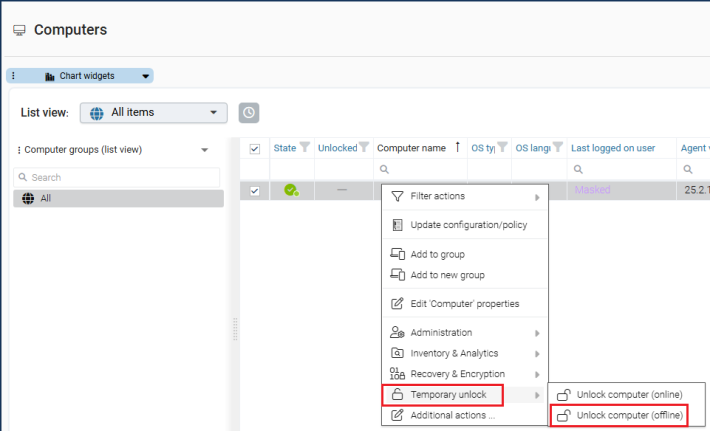
The wizard for offline unlocking opens.
Depending on the configuration, authenticate using a password or certificate.
Enter the computer name and the request code provided by the user.
The request code is valid only for a limited period of time. If the code has expired, the user must generate a new request code.
Select the categories you want to unlock. You can either unlock all drives, devices, smartphones, and applications, or limit the unlock to specific categories. Additional unlock options are also available.
Only drives and devices can be unlocked offline on Linux agents.
Specify how long the unlock lasts.
Generate the unlock code.
Provide the unlock code to the user.
The user enters the unlock code on the relevant computer. After successful validation, the offline unlock is activated for the configured period.
Related topics